| | #1 |
| timebomb Join Date: May 2007 Posts: 2,470
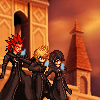
Rep Power: 6 ![]() ![]() Currently playing: Final Fantasy Tactics Advanced, Super Mario Galaxy, Big Bang Mini Level: 22 EXP: | Making a Border: To make a border, you want to go to Select>All, followed by Edit>Stroke. A good line width is anywhere from one to six pixels. A border can make your sig seem a bit more realistic, so it doesn't really look like a fancy piece of paper. Remember, not all tags need a border. Background: If you're having trouble with background making, there are a few ways to go. The first would be to smudge. Now, I believe Gimp has a smudge tool. Smudging is basically taking a stock, or even your render, and spreading it out across the signature. If you know some good smudge settings, then you can spread the pic out and make a very nice looking background. Another technique is brushing. Depending on the sig that you're making, brushes can add a variety of texture to your tag. There are many different types of brushes, such as Abstract, Chaotic, Floral, Vector, etc. among others. A good source to get these brushes is Deviantart. Try simply typing in "Gimp brushes" to start, and if you want to see specific style brushes, search "Abstract Gimp brushes". Once you download the brushes, simply experiment with them to get your own style. Don't overflood the background with brushes though, or else it will seem cluttered. Just experiment a little, and you should be fine. Spicing up the sig: To spice up a sig a little bit, adding color is very important. After brushing around, this is where you want to add a little bit of color. There are a ton of ways to add color to your sig. I'll list a few of them. Gradient Maps: Once you start getting to a point where you feel you're outside of your newb phase, you'll start using these a lot. You can choose two good colors that mix together in order to create a nice looking color scheme. Then, adjust Opacity or change the style to something like Lighten, Soft Light, Color, or anything else you'd like. Most of the time, you get a very nice picture. I'll elaborate on Gradient Maps in another tutorial that is made for middle-skilled artists. Colorize: There's an option of using the Colorize tool. Go to Layer>Color>Colorize. It will give you a wide variety of colors; sort of like the rainbow. Very basic though. Color Balance: An adjustment type thing that's really good for newbs. You can easily adjust colors here, and it always turns out looking pretty good. I still use it myself! The last thing you're going to want to know how to use are C4Ds. C4Ds are something like this: ![]() Again, it's easiest to find these at Deviantart, Planet Renders, or other GFX dedicated places. Placing this in the background of a tag can really spice the sig up. Most of the time, you'll want to change the mode to Lighten or Screen, something to that effect. If you do this correctly, it will really give the sig some good effects. So go ahead and try that out! Renders: Most people who get into GFX know what a render is. For those who don't, a render is basically an image with it's background cut out. The best resources for renders are Planet Renders, Gaming Renders, Simple Renders, and Anime Renders. You can also make your own renders, but I'll describe that in a more advanced tutorial. Remember to save the render to your computer. If you simple copy and paste, you'll end up with a black background! This is an excellent example of a render: ![]() Scaling your render is always important. You don't just want to copy and paste the render in as it is! Scaling is simply the changing in size of your render, to make it bigger or smaller. The easiest method for doing this is hitting ctrl+t. And there you go, you now have a perfect-sized render! The positioning of your render can effect the way your piece will come out. As your render is often your focal point, or main point of action, you want to keep it the priority. Basically, this means you don't want to cover it up with too many effects. Your render should always remain the center of attention. Always remember that! The render you choose can also determine the flow of your art piece. For example, if you were to choose a render such as this: ![]() There is virtually no flow. But if you were to choose to use a render like this: ![]() You can obviously see the flow of the render very clearly, since his arm is pointing in a certain direction. I will expand on depth and flow in a later tutorial. Text: The best place to get text is DaFonts.com. It offers a wide variety of categories and you can even search for texts you want. Simply save it to where your computer holds fonts, and you can easily access it through any gfx program you're using. Remember that text isn't always necessary, and should never be forced. This means that not every sig needs text. If it doesn't follow the flow, or even just doesn't feel right, then just take it out. More often that not, the sig will look a lot better. Mastering text placement is a very difficult thing to do, and even some longtime veterans still don't have it down, so don't feel bad if you don't get it on your first few tries. Just keep doing what looks right to you. Definitions Guide: Diagonal - The line that runs across (East to West). Illumination - The decoration of manuscript pages often with gold leaf and brilliant colors. Illustration - An artwork developed accompany ; a story, advertisment or written text. Impression - An cutedoor painting technique that attempted to show the changing efforts of light and shadow through clay. Italian Renaisseunce - The revived of cassical art, litterature and learning based on science and math. Famous artists of this period include Leanardo Vinci, Donatello, Michealangelo, Repheal, and Bondtello (Creators of the TMNT or Teenage Mutant ninja Turtals if you did not know). Landscape - A Screnry painting also can include a cityscape or seascape. Medium - The meterial that is used in artwork. (Ex: Clay, Pencil, Water Colors, Charcoal, Oil Pestels etc.) Monochromatic - Using many tints of shades but from one color (added by Ikarou on June 18th) I had this one then lost it. Mural - A continous painting designed and created to fit a wall. Non Objective - An abstract artwork that contains no objects. Pointillisim The application of pure color small dots which allows the eye to do the mixing (Such as red and blue dots would mix your eyes to make violet.) Gorge Suerant is the master of this Dot techinque. Polychromatic - Using two or more colors; Multicolored (added by ikarou on June 18th). Pop Art - Objects form Popular culture transformed into fine artworks. Realisim - An artists attempt to re-create a subject as accuretly as possible Secomdary Colors - Green, Voilet, and Orange colors that can be created by mixing the Primary Colors (Also a definition) Stylize - To abstract a form leaving it simpler yet still reconizable. Surrealisim - An art style in whic dreams, fantasy, and the subconcious serve as insperation. Surrealisimpainters often place un-realated objects in unatural. Trompe L'oeil - A painting so real looking that you want and feel that you could touch the object within (Ex: The chicken noodle soup can, Ketchup Bottle, etc.) Two Dimentional - Artwork that is flat and can only be measured in Z way ; height and widtch aka. h x w (math form) Typography - The art or designing and artistically using alphapet forms. Unity - A feeling that all parts of a composition are working together. Value - The lightness or Darkness of a color. Vertical - The line that runs up and down (North to South). Viewpoints - The sides of angels that form which a object that can be seen. Visualize - To form a mental picture using ones imagination or memory Well, I hope this helped some of you. I'm sure I'll make ones for middle level and advanced level artists when I have enough time. Thanks everyone, and I hope you use this sometime! |
![]() | |
| | #2 |
| SRPA ftw Join Date: Jun 2007 Location: Philly Posts: 2,416
Rep Power: 6 ![]() ![]() Level: 16 EXP: | Oh jesus, thanks spiff. This should help. |
![]() | |
| | #3 |
| Keyblade Wielder | OMG this is AWESOME!!!!!!!!!!!!!!! thanks dude:thumbsup: |
![]() | |
| | #4 |
| NEWFAGS CAN'T TRIFORCE | This is so good :3 |
![]() | |
| | #5 |
| timebomb Join Date: May 2007 Posts: 2,470
Rep Power: 6 ![]() ![]() Currently playing: Final Fantasy Tactics Advanced, Super Mario Galaxy, Big Bang Mini Level: 22 EXP: | Thanks everybody. I plan to make a new one as soon as possible |
![]() | |
| | #6 |
| Why I like you Join Date: Oct 2006 Location: In front of my comp XD Age: 18 Posts: 2,317
Rep Power: 6 ![]() Level: 30 EXP: | Nice thread, you seem to be a good teacher from what I'm reading. This will help a lot of people so that's nice of you ^__^ |
| | |
| | #7 |
| go for broke! Join Date: Mar 2005 Posts: 6,803
Rep Power: 13 ![]() ![]() ![]() Currently playing: sf4 i guess Level: 38 EXP: | Unfortunately most of the time writing this was wasted, especially the last part. Most people who do sigs don't treat it as art, and I'm pretty sure you don't either, or else you wouldn't be here. Talking about different forms of art in the last part was unnecessary, and redundant. Similarly, those aren't call C4D's. C4D is the program that makes them, but similarly, you can also use programs such as Maya to create similar renders. The more 'proper' term when it comes to graphic design would be renders. Would you call a render created from Maya, Maya's? No. Then stop calling them by the abbreviation of the program. On the other hand, some people don't just use renders to "spice up" their tags. If good enough, and with imagination, you can create a background only using renders, so keeping it separate from "Backgrounds" is weird. |
| | |
| | #8 | |
| timebomb Join Date: May 2007 Posts: 2,470
Rep Power: 6 ![]() ![]() Currently playing: Final Fantasy Tactics Advanced, Super Mario Galaxy, Big Bang Mini Level: 22 EXP: | Quote:
I've never seen them be called by anything other than C4D's, so of course that's what I call them. I'm not going to invent my own name, especially when I thought they were actually called C4D's. I'm assuming you're referring to what I know as C4D's when you say renders, and I must say that it is indeed possible to do a piece that is completely stockless and only uses renders, but that's not exactly easy for newbies, now is it? | |
![]() | |
| | #9 |
| your father Join Date: Oct 2004 Age: 17 Posts: 2,394
Rep Power: 8 ![]() Level: 16 EXP: | A good tip would be : DONT FUCKING SUCK And apparently you don't know your vocabulary so stop preaching what you don't know. |
![]() | |
| | #10 | |
| Hi kids! Do you like violence? | Quote:
Anyway, props to Spiffy for the help thread. | |
![]() | |
| | #11 | |
| your father Join Date: Oct 2004 Age: 17 Posts: 2,394
Rep Power: 8 ![]() Level: 16 EXP: | Quote:
And thats like me teaching others about rocket science, I don't know what the fuck I am talking about so I won't try to teach it. Learn to read pl0x. | |
![]() | |
| | #12 |
| timebomb Join Date: May 2007 Posts: 2,470
Rep Power: 6 ![]() ![]() Currently playing: Final Fantasy Tactics Advanced, Super Mario Galaxy, Big Bang Mini Level: 22 EXP: | No, but that's a nice try. You're basically saying I have no idea what I'm talking about in terms of the vocabulary. Yet, as evident by this thread in itself, I do. So, it's more like you teaching others about rocket science, and pretending that you don't know what the fuck you're talking about just to fuck with the tykes. |
![]() | |
| | #13 | |
| Hi kids! Do you like violence? | Quote:
I could pretty much ask the same for you. I'd like to see you make a help thread like this. Then I'd probably know the difference between knowing something about gfx and not knowing. Plus, you make it seem as if he didn't know a damn thing about making a signature. You don't need to know the whole encyclopedia of gfx to help people out. And I'm pretty sure this'll help any newb trying to learn how to do this stuff as stated above. So get with the program and post something useful. | |
![]() | |
| | #14 | |
| your father Join Date: Oct 2004 Age: 17 Posts: 2,394
Rep Power: 8 ![]() Level: 16 EXP: | Quote:
| |
![]() | |
| | #15 | |
| timebomb Join Date: May 2007 Posts: 2,470
Rep Power: 6 ![]() ![]() Currently playing: Final Fantasy Tactics Advanced, Super Mario Galaxy, Big Bang Mini Level: 22 EXP: | Quote:
As I have already stated, the ways I've always heard that vocabulary used, a stock is an image with the background intact, a render is a picture that has had the background completely removed, and a C4D is an effect render. | |
![]() | |
![]() |
| Thread Tools | |
| Display Modes | |
| |